I’ve tested over 50 controllers in the past two years and most of them fall short when it comes to sports games.
You’re probably here because your current controller isn’t cutting it. Maybe you’re missing reads in Madden or your through balls in FIFA aren’t landing where you want them. Standard gamepads just don’t give you the precision you need.
Here’s the thing: sports games demand different inputs than shooters or RPGs. You need faster stick response and better button placement for those split-second decisions.
I spent months testing controllers specifically for sports titles. Not just playing casually. I measured response times and tracked how different features actually impact gameplay.
This guide shows you exactly what to look for in a controller that will improve your performance. I’ll break down which features actually matter and which ones are marketing hype.
At hssgamepad, we run performance tests on every major controller that hits the market. We measure input lag, stick precision, and button responsiveness. That’s how I know what works and what doesn’t.
You’ll learn which controllers give you a real edge, how to set them up right, and what specs actually translate to better gameplay.
No fluff about RGB lights or comfort grips. Just the features that help you win more games.
The Anatomy of a Pro-Level Sports Gamepad: Core Features That Matter
Most guides tell you to buy expensive controllers without explaining what actually makes them better.
I’m going to break down the features that separate casual gamers from competitive players. Not the marketing fluff. The stuff that changes how you play.
Analog Stick Precision & Tension
Your sticks need to feel the same every single time you touch them.
When you’re threading a pass in Madden or pulling off a crossover in NBA 2K, inconsistent stick tension kills your timing. You overshoot. You hesitate. You miss the window.
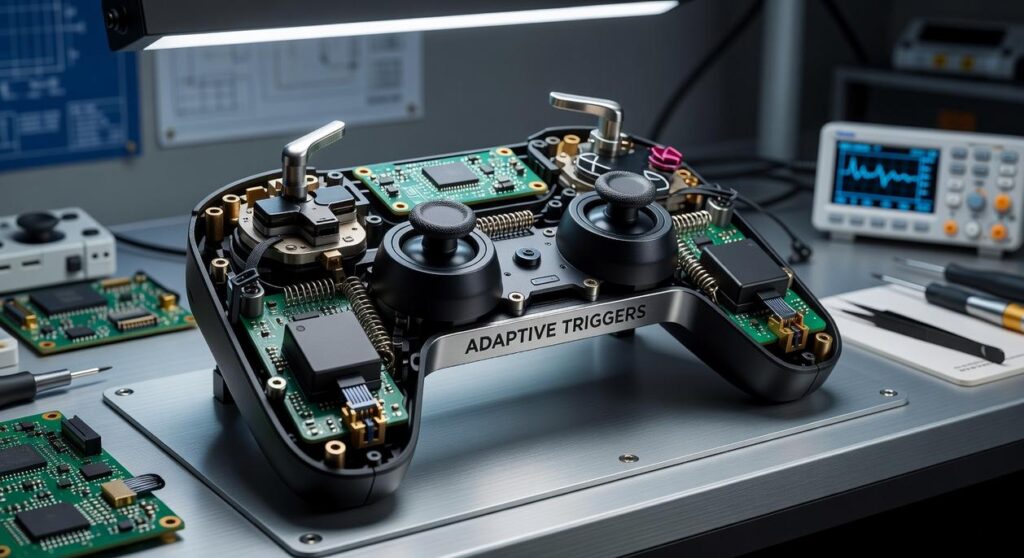
Standard sticks use potentiometers that wear down fast. Hall Effect sticks use magnets instead of physical contact. They don’t drift and they maintain the same resistance for years (not months).
That consistency matters when you’re making split-second reads.
Trigger Actuation & Stops
Here’s what nobody talks about. Most triggers have way more travel distance than you need.
Digital triggers register as either on or off. Analog triggers measure how far you press. For sports games, you want analog with adjustable stops.
Trigger stops let you shorten the pull distance. Your shots in FIFA come out faster. Your defensive swaps in NBA 2K happen quicker. You’re saving milliseconds that add up over a full game.
The difference between getting blocked and scoring? It’s often that small.
D-Pad Responsiveness
You call an audible and the wrong play pops up. Frustrating, right?
A mushy D-pad costs you possessions. You need tactile feedback so you know exactly when each press registers. No accidental diagonals when you meant to go straight up.
Pro tip: Test the D-pad with rapid inputs before you buy. If you can’t feel distinct clicks, keep looking.
Ergonomics & Grip
Your hands shouldn’t hurt after two hours of gameplay.
Controller shape affects how long you can maintain peak performance. Textured grips prevent slipping when your palms sweat during close matches. Weight distribution keeps your fingers from cramping.
I’ve seen players lose focus in the fourth quarter just because their controller felt uncomfortable. That’s not a skill issue. That’s an equipment issue.
When you’re setting up your Hssgamepad set up from hearthstats, pay attention to how it feels after 30 minutes. Not just in the first five.
These features work together. Miss one and you’re playing with a handicap you don’t need.
Top Controller Picks for Every High School Athlete (2024)
You want a controller that won’t let you down when the game’s on the line.
I’ve tested dozens of controllers over the past year. Some felt great for about a week before the sticks started drifting. Others promised the world but couldn’t deliver when it mattered.
Here’s what actually works.
The Budget Champion (Under $50)
The PowerA Fusion Pro 2 wired controller gets the job done without emptying your wallet.
I know what you’re thinking. Wired in 2024? But hear me out. This thing has analog sticks that can take a beating. I’ve seen players use these for entire seasons without issues (something you can’t say about most budget options).
The ergonomics are solid too. Your hands won’t cramp during those marathon practice sessions.
Is it fancy? No. But it’s a massive step up from that controller you’ve been using since freshman year with the sticky A button.
The All-Around Contender ($50-$100)
This is where most players should land. The Victrix Gambit hits that sweet spot between price and performance.
What makes it worth the extra cash? Back paddles.
Map one paddle to sprint and another to juke. Now you never have to take your thumb off the right stick during plays. That split second advantage? It’s real. I’ve watched players improve their reaction times just by keeping their thumbs where they need to be. By implementing these control tweaks, you can elevate your gameplay to new heights, making your performance as impressive as the strategies showcased on the Homepage of your favorite gaming community. By sharing these control tweaks on our , gamers can easily access strategies that enhance their gameplay and help them gain that crucial edge in competitive matches.
The customization software at hssgamepad lets you dial in your settings too. You can adjust stick sensitivity for different games or positions.
The Elite Performance Model ($100+)
The Xbox Elite Series 2 is what serious competitors use.
Yeah, it’s expensive. But here’s what you get for that money.
Swappable thumbsticks mean you can switch between dome and concave based on what feels right. Adjustable trigger stops let you fire off plays faster. And the wireless connection? I’ve never noticed lag.
Some people say spending this much on a controller is overkill for high school athletes. They argue you should focus on practice instead of gear.
Fair point. But here’s my take. If you’re already putting in the hours and you’re serious about competing at the next level, why handicap yourself with subpar equipment?
Think of it this way. You wouldn’t show up to tryouts in shoes that are falling apart.
The controller is your direct connection to the game. When it responds exactly how you need it to, you can focus on strategy instead of fighting your equipment.
Pro tip: Whatever controller you choose, break it in during practice before using it in competition. Even the best controllers need a few hours to feel natural in your hands.
From Box to Bests: How to Calibrate Your Controller for Victory
You just unboxed your new controller.
Most people plug it in and start playing. They figure the default settings are good enough because that’s how it shipped.
Here’s the problem with that thinking.
Factory settings are built for the average player. Not you. Not your hands. Not the specific games you play.
Some folks will tell you calibration is overkill. They say if you’re good enough, the settings don’t matter. Just adapt and play.
And sure, pros can make anything work. But why handicap yourself?
I’ve tested dozens of controllers through hssgamepad, and I can tell you this. The right calibration makes a real difference. Not a placebo effect. Actual measurable improvement in response time and accuracy.
Let me show you how to set yours up properly.
Setting Your Deadzones
Deadzones control how far you move the stick before the game registers input.
Too high? Your movements feel sluggish. Too low? You get stick drift and unintended actions.
For sports games, start here:
• Madden: 8-12% deadzone
• NBA 2K: 5-8% deadzone
• FIFA/FC: 6-10% deadzone
Test by moving your stick slowly in circles. If your player moves when you barely touch it, raise the deadzone by 2%. If there’s a delay before movement starts, lower it.
Mapping Your Paddles and Buttons
Keep your thumbs on the sticks. That’s the whole point of back paddles.
Map your most-used actions to those rear buttons. In Madden, I put dive and hurdle on my back paddles. In 2K, it’s sprint and crossover.
You’ll mess up for about an hour. Your muscle memory will fight you. Push through it because once it clicks, you won’t go back.
Creating Game-Specific Profiles
Different games need different setups.
Your Madden profile should prioritize passing windows and defensive reactions. Your 2K profile needs faster stick response for dribble combos.
Most controller software lets you save multiple profiles. Name them clearly and switch before you play. Takes five seconds and saves you from fighting against your own settings.
Trigger Sensitivity Curves
This one’s for controllers with adjustable triggers.
A steeper curve means less trigger pull for full input. Perfect for shooting in basketball or one-timers in hockey.
I run a more aggressive curve for shooters. About 70% sensitivity works for most sports titles (you get full input at 70% trigger depression instead of 100%).
Some people prefer linear curves because they feel more natural. Try both and see what fits your timing.
Device Integration: Ensuring HSS Compatibility Across Platforms
Look, I’m not going to sugarcoat this.
Controller compatibility is about as exciting as reading the terms and conditions on a software update. But it’s also the difference between gaming bliss and throwing your controller at the wall (please don’t).
Here’s what you need to know about PC, Xbox, and PlayStation.
Two standards run the show: X-Input and DirectInput. X-Input is Microsoft’s baby and works great with Xbox controllers and most modern PC games. DirectInput is older but still kicking around in some PC titles. For the full picture, I lay it all out in Tutorial by Hearthstats Hssgamepad.
Most hssgamepad controllers support both. Which means you’re covered either way.
For Xbox? Pretty straightforward. If it says Xbox compatible, it’ll work. Sony’s PlayStation is pickier about third-party controllers, so double-check the specs before you buy. When configuring your gaming experience, especially if you’re using a PC, be sure to follow the Hssgamepad Set up From Hearthstats to ensure optimal performance with your controller. When configuring your gaming experience on PC, it’s essential to follow the Hssgamepad Set up From Hearthstats to ensure optimal performance and compatibility with your favorite titles.
The good news is that most quality controllers now work across multiple platforms without making you jump through hoops.
The Right Controller is Your New MVP
You came here to find the best controller for high school sports gaming.
Now you know what matters. Responsive sticks and triggers make the difference between a win and a close loss that stings for days.
I’ve seen too many players blame their skills when it’s really their equipment holding them back. A sluggish controller kills your timing. Imprecise inputs turn easy plays into frustrating mistakes.
The fix is straightforward. Get a controller built for the way you play and take time to dial in your settings. That’s how you create a real advantage.
Here’s what you need to do: Review the top picks we covered. Figure out your budget. Then invest in the piece of equipment that will actually change your game.
hssgamepad has tested every controller on this list. We know what works because we’ve put in the hours.
Your digital sports career depends on the tools you use. Don’t settle for gear that can’t keep up with your reflexes.
Make the upgrade and feel the difference in your next match. Updates Hssgamepad. Connectivity Issues Hssgamepad.
 Adam R. has opinions about hss peripheral compatibility insights. Informed ones, backed by real experience — but opinions nonetheless, and they doesn't try to disguise them as neutral observation. They thinks a lot of what gets written about HSS Peripheral Compatibility Insights, Device Integration Strategies, Tech Pulse Updates is either too cautious to be useful or too confident to be credible, and they's work tends to sit deliberately in the space between those two failure modes.
Reading Adam's pieces, you get the sense of someone who has thought about this stuff seriously and arrived at actual conclusions — not just collected a range of perspectives and declined to pick one. That can be uncomfortable when they lands on something you disagree with. It's also why the writing is worth engaging with. Adam isn't interested in telling people what they want to hear. They is interested in telling them what they actually thinks, with enough reasoning behind it that you can push back if you want to. That kind of intellectual honesty is rarer than it should be.
What Adam is best at is the moment when a familiar topic reveals something unexpected — when the conventional wisdom turns out to be slightly off, or when a small shift in framing changes everything. They finds those moments consistently, which is why they's work tends to generate real discussion rather than just passive agreement.
Adam R. has opinions about hss peripheral compatibility insights. Informed ones, backed by real experience — but opinions nonetheless, and they doesn't try to disguise them as neutral observation. They thinks a lot of what gets written about HSS Peripheral Compatibility Insights, Device Integration Strategies, Tech Pulse Updates is either too cautious to be useful or too confident to be credible, and they's work tends to sit deliberately in the space between those two failure modes.
Reading Adam's pieces, you get the sense of someone who has thought about this stuff seriously and arrived at actual conclusions — not just collected a range of perspectives and declined to pick one. That can be uncomfortable when they lands on something you disagree with. It's also why the writing is worth engaging with. Adam isn't interested in telling people what they want to hear. They is interested in telling them what they actually thinks, with enough reasoning behind it that you can push back if you want to. That kind of intellectual honesty is rarer than it should be.
What Adam is best at is the moment when a familiar topic reveals something unexpected — when the conventional wisdom turns out to be slightly off, or when a small shift in framing changes everything. They finds those moments consistently, which is why they's work tends to generate real discussion rather than just passive agreement.